CS08 Build-the-Best-Computer Benchmarking Challenge
Pathway: Main Quest
Prerequisites: CS01-CS07
Previous: Safe opening and computer parts
Unit home: Computer Systems
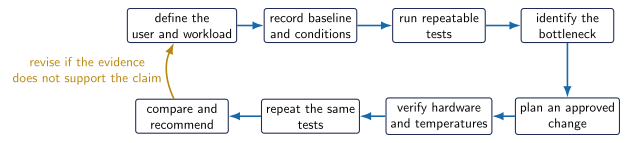
Make a copy of the 3.4 Linux Benchmarking Challenge draft. Do not begin until your teacher posts it in Google Classroom and confirms the approved tools and hardware.
Define what best means for the assigned user before final testing. Record hardware, operating system, benchmark version, run conditions, units, and baseline results. Use evidence to identify a bottleneck and propose an approved compatible change.
Formal benchmarking begins after the system is operational. USB live-session boot time is a deployment check, not a fair benchmark. An approved storage improvement may be included when equipment is available, but an SSD installation is not required. SQ03 remains the deeper storage and expansion Side Quest.
After the change, complete the inspection gate and rerun the same tests under identical conditions. Report boot/login time, a CPU task, a memory task, a storage task, temperature evidence, and one real user task such as loading Tinkercad or opening Inkscape.
Submit the build plan, parts record, before/after table, graph, uncertainty note, and evidence-based recommendation.